
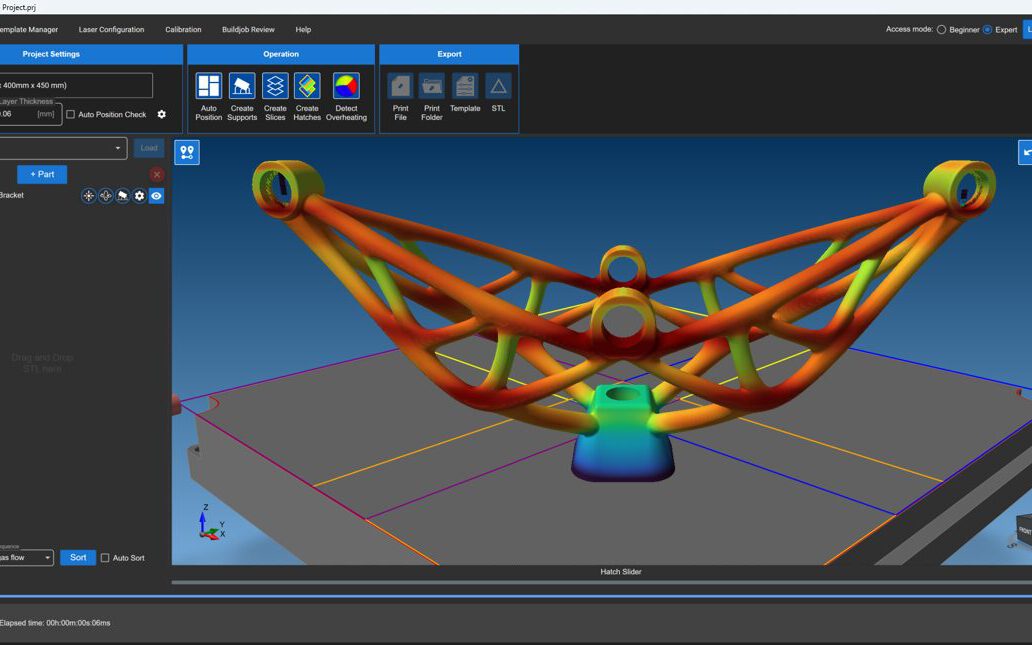
A metal part doesn’t fail on the build plate. It fails on the screen, hours or days before the laser ever fires — you just don’t always find out until the build is over.
That’s the core problem build preparation software exists to solve. In laser powder bed fusion (LPBF), the distance between „the CAD model is done“ and „the part is built correctly“ is longer than most workflows account for. Closing that distance is not a machine software problem. It’s a physics problem — and it needs its own layer of the stack.
The Gap Between CAD and the Machine
CAD software tells you what a part should look like. Machine control software tells the printer where to put the laser next. Neither one tells you what will actually happen inside the build chamber as thousands of thin metal layers are melted, cooled, and stacked on top of each other.
That’s a meaningful gap. Every layer in an LPBF build generates and redistributes heat. Heat drives residual stress. Residual stress drives warping, cracking, and support failure — and it does so in ways that are almost impossible to predict by eye, no matter how experienced your process engineer is. Support strategies and scan parameters that work perfectly on one geometry can fail outright on the next.
Build preparation software sits in exactly that gap — between the CAD file and the machine’s control system — and answers the question neither of the other two can: will this build actually work, and if not, where will it go wrong first?
What Build Preparation Software Actually Does
At its core, this layer of software runs a physics-based simulation of the build before any metal is melted. It models thermal behavior layer by layer, predicts where distortion and stress will concentrate, and lets engineers correct the plan — hatching pattern, scan order, support placement, laser power — while the fix still costs nothing but compute time.
Skip this step, and those same problems get discovered on the machine instead of on a screen. That means burned powder, hours of machine time, a scrapped part, and a schedule slip — repeated until the process engineer has effectively hand-tuned the parameters through trial and error. In regulated, complex-sale industries like aerospace and energy, that trial-and-error cycle is not just expensive. It’s a certification risk.
Where GENESIS Print Suite Fits
This is the space AMSIS built GENESIS Print Suite to occupy: a physics-based build preparation platform that sits between CAD and machine control, giving engineering teams a way to validate a build plan before it becomes a physical commitment.
GENESIS is organized around three connected capabilities:
- Build Engine (Fast Heat Simulation) — predicts thermal behavior and distortion across the full build, layer by layer, before printing starts.
- Smart Hatching — optimizes scan paths and hatching strategy to reduce residual stress and warping at the source, rather than compensating for it afterward.
- Power Control — fine-tunes laser parameters across the build to maintain consistent melt quality where geometry, thickness, or thermal history would otherwise cause it to drift.
Together, they replace guesswork with a repeatable, physics-grounded process — one that scales across parts, machines, and operators instead of living in one engineer’s head.
Built for a Multi-Vendor Reality
Metal AM production floors are rarely single-vendor. GENESIS is built to work across the LPBF systems teams are actually running, including EOS, Nikon SLM Solutions, DMG Mori, Colibrium Additive, Aconity3D, Eplus3D, and Additive Industries — so build preparation doesn’t force a hardware standardization project just to get the benefit of simulation.
That approach is already in production use with teams solving exactly this problem at scale, including Premium Aerotec and Fraunhofer research institutes — organizations where a failed build isn’t just a cost, it’s a delay in a program that can’t afford one.
The Bottom Line
Build preparation software isn’t an optional add-on to metal AM — it’s the layer that makes LPBF production predictable instead of experimental. If your process still depends on running a build to find out whether it will work, that’s the gap GENESIS Print Suite was built to close.
Frequently asked questions
What is build preparation software in metal additive manufacturing?
It's the simulation layer that sits between CAD design and machine control software, predicting how a part will behave — thermally and structurally — during an LPBF build, before printing starts.
Why can't CAD or machine control software handle this on its own?
CAD defines geometry and machine software executes toolpaths, but neither models the physics of heat buildup, residual stress, or distortion across a multi-layer metal build. That requires a dedicated physics-based simulation step.
What happens if you skip build preparation and simulation?
Problems that could have been caught on screen — warping, cracking, support failure, poor melt quality — show up on the build plate instead, costing machine time, powder, and schedule, often after multiple failed attempts.
Which LPBF systems does GENESIS Print Suite work with?
GENESIS is built to work across a multi-vendor fleet, including EOS, Nikon SLM Solutions, DMG Mori, Colibrium Additive, Aconity3D, Eplus3D, and Additive Industries.